URL Metadata
URL Metadata Collector
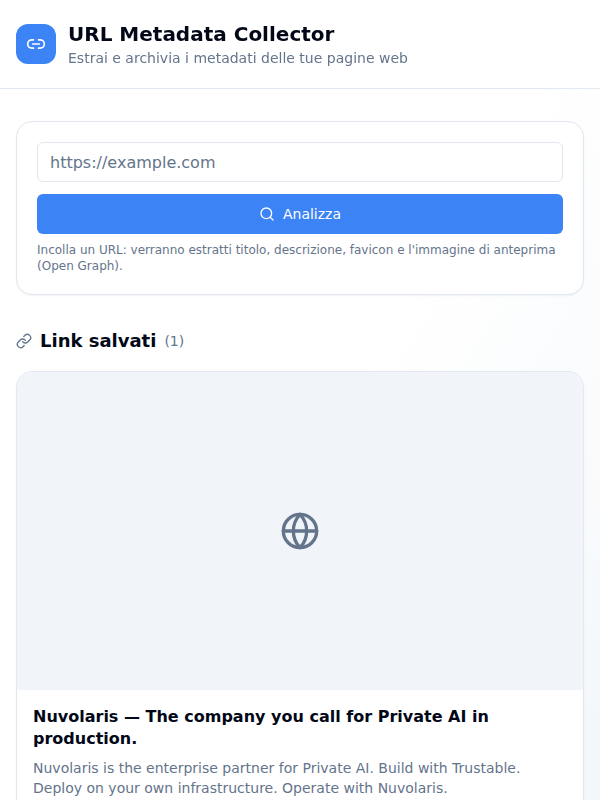
Paste a link and get back what that page says about itself — its title, description, favicon and social preview image — then keep it in a growing gallery of everything you’ve collected.
It’s the same information a chat app or social network shows when you share a link, extracted on demand and archived so you can come back to it.
Collecting a link
One field, one button. Paste a URL and press Analizza. You can leave the
scheme off — example.com/page is completed to a full address — but anything
that isn’t a real http or https URL is refused with an explanation rather
than a silent failure.
The page is fetched, parsed, and reduced to the fields that matter:
- Title — the Open Graph title if the page declares one, otherwise its
<title>, falling back to the hostname - Description — the Open Graph description, otherwise the standard meta description
- Favicon — the icon the page links to, resolved to an absolute address,
falling back to
/favicon.icoat the site root - Preview image — the Open Graph image, with relative paths resolved against the page
- Site name, and the time it was extracted
The input clears on success and keeps what you typed when something goes wrong, so a typo is easy to correct. Failures say what actually happened — a timeout, a refused connection, an HTTP error, a page that isn’t HTML, or one too large to parse.
The gallery
Everything you’ve collected appears below as social-preview style cards, newest first: preview image on top, favicon and title, the description, and the hostname as an outbound link. Cards with no image show a placeholder, broken images are hidden rather than left as broken icons, and pages with no description say so plainly. Clicking anywhere on a card opens the original page in a new tab.
A link you’ve already analysed is served straight from the archive and marked with a cached badge, so re-analysing costs nothing and never re-fetches the site. Before you collect anything, an empty state invites you to paste your first link.
How it is put together
The interface is a React and TypeScript single-page app (Vite, Tailwind CSS, TanStack Query) — a single screen, in Italian.
Behind it are two Python actions on Apache OpenServerless:
| Endpoint | Does |
|---|---|
POST /api/my/v1/extract-metadata | fetch a URL, extract its metadata, archive it |
GET /api/my/v1/list-metadata | the 50 most recently collected links |
Extraction uses requests and BeautifulSoup, with a 12-second timeout, a
declared User-Agent, and a 5 MB cap so an enormous page can’t be pulled in. The
results are stored in MongoDB, which doubles as the cache: a lookup by URL
comes first, and the page is only downloaded on a miss. If archiving fails, the
extracted metadata is still returned, with a warning.
A setup action, setup/metadata-index, creates the two indexes the collection
needs — a unique index on url that makes cache lookups fast and keeps
duplicates out, and a descending index on inserted_at for the newest-first
listing. It is idempotent, so re-running it is safe.
Getting started
npm install
npm run dev
The backend needs MongoDB configured; run the setup action once to create the indexes. Then paste a link and watch the gallery fill up.