
JSON Formatter
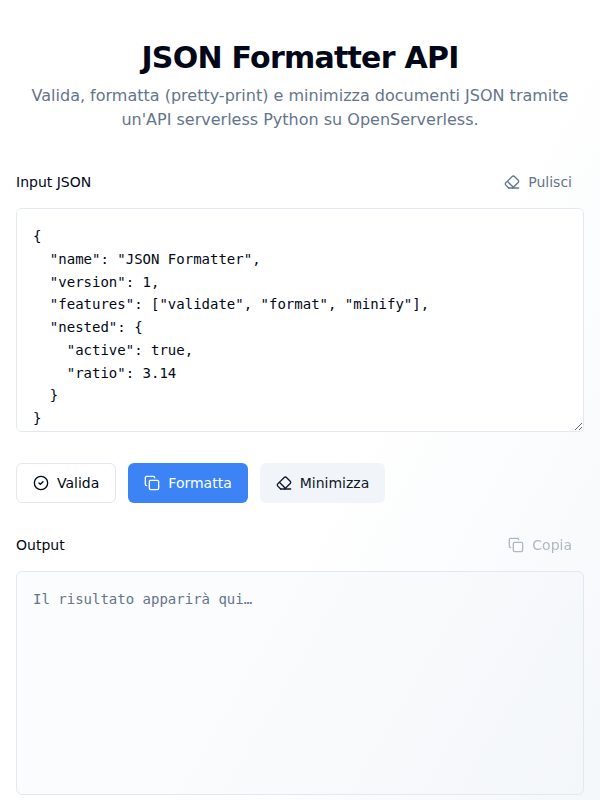
JSON Formatter API
A small, focused tool for working with JSON: paste a document, then validate it, pretty-print it, or minify it.
The web page is a single screen — an input area, three buttons, and an output area — but the work happens in a serverless API, so the same three operations are available as public REST endpoints for scripts and other applications.
What you can do
Paste and edit. The input area opens with a sample document and takes any JSON you paste or type, valid or not. A Clear button empties both panes.
Validate. Checks whether the document parses. Valid input gets a green
confirmation; invalid input gets the exact syntax error, with line, column and
character position — Expecting value: line 1 column 24 (char 23) — so you can
go straight to the problem.
Format. Pretty-prints the document with four-space indentation, keeping non-ASCII characters readable rather than escaping them.
Minify. Strips every space and newline, emitting the most compact representation of the same data.
Copy the result. The output pane shows the formatted or minified document with a one-click copy button, and confirms when it’s on the clipboard.
Each run reports plainly whether it succeeded or failed, and the page lists the three REST endpoints at the bottom so you can call them yourself.
The API
All three operations are public web actions. POST to:
| Endpoint | Does |
|---|---|
/api/my/json-tools/validate-json | validate |
/api/my/json-tools/format-json | pretty-print (4-space indent) |
/api/my/json-tools/minify-json | minify (compact separators) |
Responses are always HTTP 200 with Content-Type: application/json; the outcome
is in the body:
validate-json→{"valid": true}or{"valid": false, "error": "<syntax error>"}format-json/minify-json→{"ok": true, "output": "<json>"}or{"ok": false, "error": "<message>"}
Three ways to send the document
- Raw text —
Content-Type: text/plain, body is the JSON text. The recommended way to check possibly-invalid JSON: malformed text reaches the action intact. - Envelope —
Content-Type: application/json, body{"input": "<json text>"}. Use this to send malformed JSON from a JSON client: the platform discards unparseableapplication/jsonbodies before the action ever runs, so the text has to travel inside a string. This is what the web page uses. - Parsed object —
Content-Type: application/json, body is a valid JSON value. The action re-serializes and processes it.
Examples
# validate — valid
curl -s -X POST .../api/my/json-tools/validate-json \
  -H "Content-Type: text/plain" -d '{"name":"Mario","eta":30,"attivo":true}'
# {"valid": true}

# validate — malformed
curl -s -X POST .../api/my/json-tools/validate-json \
  -H "Content-Type: text/plain" -d '{"name":"Mario", "eta":}'
# {"valid": false, "error": "Expecting value: line 1 column 24 (char 23)"}

# validate — malformed, via envelope
curl -s -X POST .../api/my/json-tools/validate-json \
  -H "Content-Type: application/json" -d '{"input":"{\"name\":\"Mario\", \"eta\":}"}'

# format, printing just the result
curl -s -X POST .../api/my/json-tools/format-json \
  -H "Content-Type: text/plain" -d '{"b":2,"a":1}' | jq -r .output

# minify a pretty-printed file
curl -s -X POST .../api/my/json-tools/minify-json \
  -H "Content-Type: text/plain" --data-binary @document.json | jq -r .output
Inside the workbench the base URL is http://localhost:5173.
How it is put together
The page is a React and TypeScript single-page app (Vite, Tailwind CSS,
shadcn/ui). Behind it are three Python actions on Apache OpenServerless, one per
operation, in the json-tools package. Processing is entirely stateless and
in-memory and uses only Python’s built-in json module — no database, no
external dependencies.
Each action’s logic lives in its own module (validate_json.py,
format_json.py, minify_json.py); the neighbouring __main__.py is the
platform-generated wrapper that exposes it as a public web action and is not
edited by hand. Note the naming rule: package and action segments may contain
only letters, digits and hyphens, so the endpoints are validate-json,
format-json and minify-json — the underscore forms are not valid URLs.
manifest.yaml describes the same topology declaratively, as a
reference for external OpenWhisk/OpenServerless environments; in this workbench
deployment is handled by the managed ops ide devel watcher.
Getting started
npm install
npm run dev
The page opens with a sample document loaded and the three actions ready.