
Mini CRM
A small CRM for the two things that actually matter day to day: who your customers are, and what you owe them next.
Customers on one side, scheduled activities on the other, and a dashboard that always shows what’s due first.
Dashboard
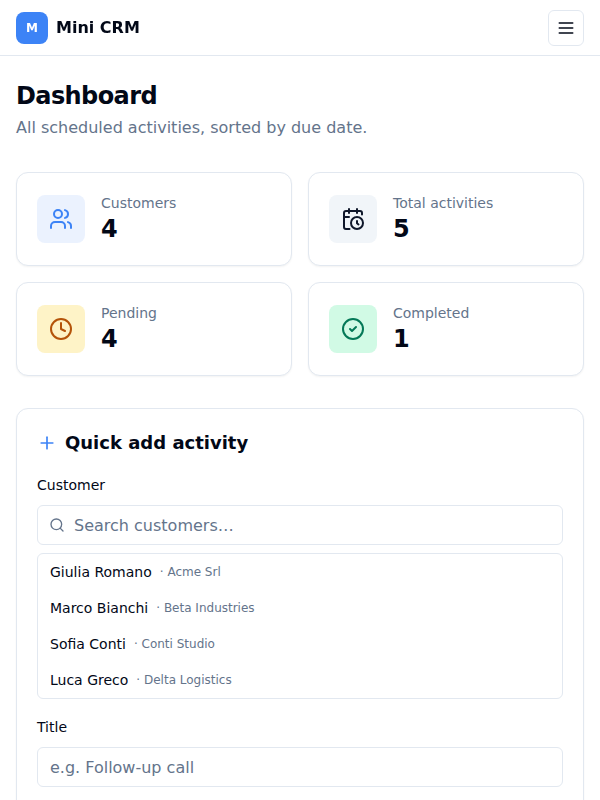
The home page opens on four counters — Customers, Total activities, Pending and Completed. Each one is a button: click it to drill into the matching list, with a back link to return. The numbers refresh themselves after every change; nothing ever needs a reload.
Below them, every activity is listed in due-date order, each showing the customer it belongs to. Completed ones are struck through and greyed out so the open work stands out. On each row you can:
- mark it complete — or reopen it if you ticked it by mistake
- postpone it to another date, chosen in a dialog
- delete it, behind a confirmation that names the activity
The list re-sorts itself immediately after any of these, so a postponed task moves to its new place at once.
Creating an activity quickly
A panel sits on the dashboard beside the list, built for speed. Start typing a customer’s name and the matches filter as you type; pick one, add a title, an optional description and a due date, and save. The new activity drops straight into its chronological position, the counters update, and the form clears itself ready for the next one. Title and due date are required and say so inline.
Customers
The Customers page lists everyone with their company, contact details and how many activities they have. Search matches across name, company, email and phone. You can add a customer, edit one, or delete one after confirming.
Clicking through opens the customer’s own page: full contact details — company, email, phone, notes — a count of pending work, and their complete activity history. Edit and delete are available there too, and deleting returns you to the list.
A customer needs only a name; company, email, phone and notes are all optional, and empty fields show as a dash rather than a gap.
The activity lists
Each dashboard counter opens a focused view, all of them searchable across activity title, description, customer name and company, and all kept in due-date order:
- All activities — everything, whatever its status
- Pending — only what’s still open, with complete, postpone and delete
- Completed — only what’s done, with reopen and delete
How it is put together
A React and TypeScript single-page app (Vite, Tailwind CSS, React Router), laid out to work from phone to desktop.
Data lives in an in-memory store seeded with a handful of example customers and activities. Everything you add or change is real for as long as the tab is open and resets when you reload — the store is deliberately kept behind simple functions so it can be swapped for a real API without touching the interface.